Pick one of 14 documented contract types. The planner turns its objective, failure conditions and pressure points into a briefing you can use before deployment.
Build a brief
What is on your contract screen?
Your note stays in this browser.
Contract briefing
Choose a documented type
Scope labelled
Select a contract type above. The brief will show the win condition, how the mission flows, what can end the run, and the preparation checks documented for that type.
Steam 1.0 · community-maintained gameplay summary
Control
◆Community tip
Community field notes — not a verified planner recommendation. Confirm every point against the objective, skull rating and tooltips in your current build.
Community objective reference: Protect cargo or communication devices on the station.
Community-reported flow
Reach each defence objective
Hold the objective while attackers close in
Keep the protected devices intact until the contract resolves
Reported failure and pressure points
Losing the protected cargo or communications objective
The objective, rather than your clone, is the critical resource
The community reference reports very little ordinary floor loot
Checks to confirm in-game
Check every defence point before committing to a firing position
Prioritize clear lanes back to the objective over deep looting detours
Version note: Community-maintained objective reference reviewed 2026-08-12; confirm the current contract text in-game
Steam 1.0 · community-maintained gameplay summary
Conquest
◆Community tip
Community field notes — not a verified planner recommendation. Confirm every point against the objective, skull rating and tooltips in your current build.
Community objective reference: Kill roughly half of the enemies on every station floor.
Community-reported flow
Enter and clear each floor
Track the remaining kill requirement floor by floor
Do not extract until every floor threshold is complete
Reported failure and pressure points
Extracting or timing out before every floor reaches its kill requirement
A cleared-looking floor may still be below its required kill count
The contract spans every floor rather than one final target room
Checks to confirm in-game
Check mission progress before leaving a floor
Budget ammunition and healing for a full-station sweep
Version note: Community-maintained objective reference reviewed 2026-08-12
Steam 1.0 · community-maintained gameplay summary
Counterattack
◆Community tip
Community field notes — not a verified planner recommendation. Confirm every point against the objective, skull rating and tooltips in your current build.
Community objective reference: Find and kill a specified enemy before the turn limit expires.
Community-reported flow
Read the target and turn limit
Search aggressively for the marked enemy
Eliminate the target before the countdown ends
Reported failure and pressure points
The target survives beyond the contract turn limit
Exploration and looting consume the same limited turns needed to find the target
Checks to confirm in-game
Treat route efficiency as the primary constraint
Delay optional looting until the target is secured
Version note: Community-maintained objective reference reviewed 2026-08-12; exact turn counts vary by contract
Steam 1.0 · community-maintained gameplay summary
Defense
◆Community tip
Community field notes — not a verified planner recommendation. Confirm every point against the objective, skull rating and tooltips in your current build.
Community objective reference: Survive the assault for the stated number of turns, then eliminate the remaining attackers.
Community-reported flow
Choose defensible ground
Survive incoming waves for the contract duration
Clear the remaining enemies before completion
Reported failure and pressure points
The clone dies before the defence and cleanup are complete
Surviving the timer alone may not finish the contract if attackers remain
Checks to confirm in-game
Build a fallback position before waves close in
Reserve ammunition for the cleanup after the timer
Version note: Community-maintained objective reference reviewed 2026-08-12
Steam 1.0 · community-maintained gameplay summary
Elimination
◆Community tip
Community field notes — not a verified planner recommendation. Confirm every point against the objective, skull rating and tooltips in your current build.
Community objective reference: Locate and kill a specified high-value target.
Community-reported flow
Identify the named target
Search until the target is revealed
Confirm the target is dead before extracting
Reported failure and pressure points
Extracting or timing out while the named target remains alive
The target may carry higher-tier equipment than ordinary enemies
Fighting the entire station is optional unless it blocks the hunt
Checks to confirm in-game
Keep enough burst damage for the target encounter
Do not spend all resources clearing unrelated rooms
Version note: Community-maintained objective reference reviewed 2026-08-12
Steam 1.0 · community-maintained gameplay summary
Escort
◆Community tip
Community field notes — not a verified planner recommendation. Confirm every point against the objective, skull rating and tooltips in your current build.
Community objective reference: Bring the assigned NPC alive to the specified destination.
Community-reported flow
Reach the escort NPC
Keep the NPC close and equipped for the route
Move together to the marked destination
Reported failure and pressure points
The escorted NPC is killed before reaching the destination
The escort can be exposed by doors, corners, and enemy focus
Community guidance says the NPC inventory and equipment can be adjusted
Checks to confirm in-game
Give the escort usable armour or a weapon when the interface allows it
Clear dangerous sight lines before moving the NPC
Version note: Official notes describe evacuation exceptions in some story Escort missions; do not assume the exception applies to every Escort contract
Steam 1.0 · community-maintained gameplay summary
Espionage
◆Community tip
Community field notes — not a verified planner recommendation. Confirm every point against the objective, skull rating and tooltips in your current build.
Community objective reference: Retrieve the requested prototype or PCPU from the station.
Community-reported flow
Search for the marked mission item
Secure it in inventory
Leave with the objective item
Reported failure and pressure points
Leaving without the requested item
The objective occupies inventory space
A fast item run can become a prolonged search if the floor is not mapped
Checks to confirm in-game
Keep at least one inventory slot open
Scan and search systematically rather than repeatedly crossing cleared rooms
Version note: Community-maintained objective reference reviewed 2026-08-12
Steam 1.0 · community-maintained gameplay summary
Infiltration
◆Community tip
Community field notes — not a verified planner recommendation. Confirm every point against the objective, skull rating and tooltips in your current build.
Community objective reference: Eliminate several specified targets while fighting through the station.
Community-reported flow
Clear enough of each floor to locate mission targets
Use proximity or scanning to reveal marked targets
Verify every required target is eliminated
Reported failure and pressure points
Extracting while any required target remains alive
Community reports note that some floors may contain no infiltration target
The objective mixes general combat with named-target hunting
Checks to confirm in-game
Check the objective counter before changing floors
Use scanning when available to reduce blind searching
Version note: Community-maintained objective reference reviewed 2026-08-12
Steam 1.0 · community-maintained gameplay summary
Robbery
◆Community tip
Community field notes — not a verified planner recommendation. Confirm every point against the objective, skull rating and tooltips in your current build.
Community objective reference: Collect the specified valuable objects from the station and extract with them.
Community-reported flow
Find the marked valuable on each required floor
Carry every contract item in inventory
Extract after the full objective set is collected
Reported failure and pressure points
Extracting without all required valuables
Dying before extraction with the objective set
Contract items consume inventory capacity and are not kept as personal loot
Multi-floor jobs can require several item slots
Checks to confirm in-game
Start with spare inventory capacity
Separate contract items from loot you are willing to discard
Version note: Official 1.0 notes say the objective pool was narrowed to high-value barter items
Steam 1.0 · community-maintained gameplay summary
Ritual
◆Community tip
Community field notes — not a verified planner recommendation. Confirm every point against the objective, skull rating and tooltips in your current build.
Community objective reference: Reach the designated area and hold it against attackers for the required turns.
Community-reported flow
Travel to the ritual zone
Enter the objective area when ready
Hold the zone until the turn requirement is satisfied
Reported failure and pressure points
The clone dies before the hold completes
Entering the area can commit the clone to a fixed defensive fight
Checks to confirm in-game
Clear nearby approach routes before starting the hold
Reload and heal before stepping into the trigger area
Version note: Community-maintained objective reference reviewed 2026-08-12
Steam 1.0 · community-maintained gameplay summary
Sabotage
◆Community tip
Community field notes — not a verified planner recommendation. Confirm every point against the objective, skull rating and tooltips in your current build.
Community objective reference: Destroy the assigned cargo or communication devices.
Community-reported flow
Locate each destructible objective
Damage it until destruction is confirmed
Check that no objective remains before extraction
Reported failure and pressure points
Extracting while a required device remains intact
Objective devices can create dangerous close-range fights
Community notes report useful ship materials in nearby containers, but looting is secondary
Checks to confirm in-game
Use range when an objective may explode
Confirm the destruction counter after each device
Version note: Community-maintained objective reference reviewed 2026-08-12
Steam 1.0 · community-maintained gameplay summary
Security
◆Community tip
Community field notes — not a verified planner recommendation. Confirm every point against the objective, skull rating and tooltips in your current build.
Community objective reference: Survive the stated number of turns and eliminate the remaining enemies.
Community-reported flow
Prepare a compact defensive area
Survive the timed assault
Finish the remaining attackers
Reported failure and pressure points
The clone dies before the timed defence and cleanup are complete
The mission may continue after the timer until all attackers are dead
Checks to confirm in-game
Keep an escape lane instead of allowing a complete surround
Save a reserve for enemies still alive after the timer
Version note: Community-maintained objective reference reviewed 2026-08-12
Steam 1.0 · community-maintained gameplay summary
Surveillance
◆Community tip
Community field notes — not a verified planner recommendation. Confirm every point against the objective, skull rating and tooltips in your current build.
Community objective reference: Protect multiple station objects as each defence point activates.
Community-reported flow
Approach a defence objective to activate its attackers
Protect the object through the engagement
Repeat for every required point
Reported failure and pressure points
A required surveillance object is destroyed
Approaching the next point can start a new fight before the clone is reset
The protected objects create separate combat zones
Checks to confirm in-game
Heal and reload before approaching the next objective
Learn the route between points before triggering another wave
Version note: Community-maintained objective reference reviewed 2026-08-12
Steam 1.0 · official patch fact
Descent
✓Verified
Verified contract boundary: Fight downward through a Bramfatura; the exact completion objective is shown by the current in-game contract.
Verified mission flow
Descend through increasingly deep floors
Manage the changing technology curve and hostile population
Use the in-game objective and extraction state to decide how far to continue
Verified risks and limits
The official source does not publish one universal failure condition; follow the current contract UI
Depth changes enemy technology tiers
Extraction risk rises as the clone carries more loot and resources are consumed
Verified preparation checks
Plan for a long operation rather than a single-room objective
Re-evaluate resources at the published technology breakpoints
Version note: Official 1.0: fewer enemies Official 1.0: Quasimorphs in the Bramfatura no longer pursue the clone immediately Official 1.0: nonlinear enemy technology progression, with notable changes around floors 1, 4, 7, and 10+
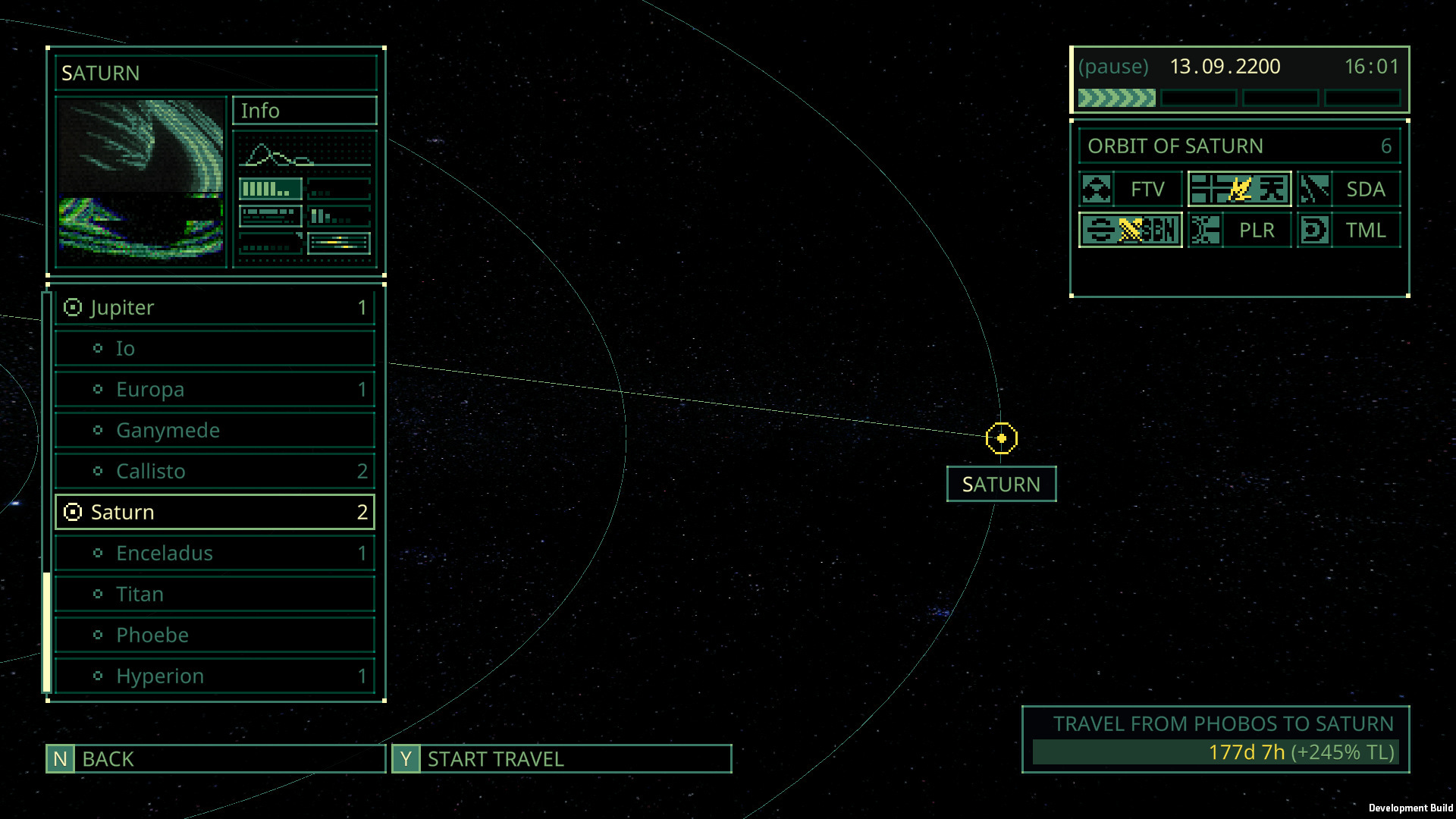
The destination screen now shows the estimated Technology growth of every faction during the trip. Read it before departure when a contract doubles as a faction decision: a short job can change the comparison you expected to make on arrival.
Do not overread the number. It is an estimate displayed for that trip, not a published prediction formula or a promise of a particular reward pool. Record the destination, travel duration and current faction goal in your private note if the choice matters.
Match the exact objective text and skull rating shown in your current build.
Plan around the listed failure condition first; rewards do not matter if the contract ends before extraction.
For community-observed details, let the in-game contract screen break ties.
Community field notes · muted autoplay
A visual tour of choosing contracts
Press q to quaff’s 8-minute guide is useful for seeing the contract-selection rhythm, but it is not a source of verified mission rules. It predates the 1.0.2 travel estimate and Descent minimap marker; let the planner and your live tooltips overrule it.
Community video. Published before Patch 1.0.2; verify contract UI and mission behavior in your installed build.
Player blocked or saving data?
On larger screens, this primary privacy-enhanced player may load muted automatically unless reduced motion or Save-Data is enabled. If it is blocked, continue with the written guide on this page.